Are Your Microsoft Security Tools Working Together or Just Running Side by Side?
Most Microsoft environments already have the right pieces. Entra handles identity, Defender watches for threats, Intune manages devices and Sentinel...
3 min read

Most Microsoft environments already have the right pieces. Entra handles identity, Defender watches for threats, Intune manages devices and Sentinel brings the signals together. The harder question is whether those tools work as one defense, or whether your team is the glue between them, hopping from console to console to connect the dots.
If it feels like the latter, you're not alone.
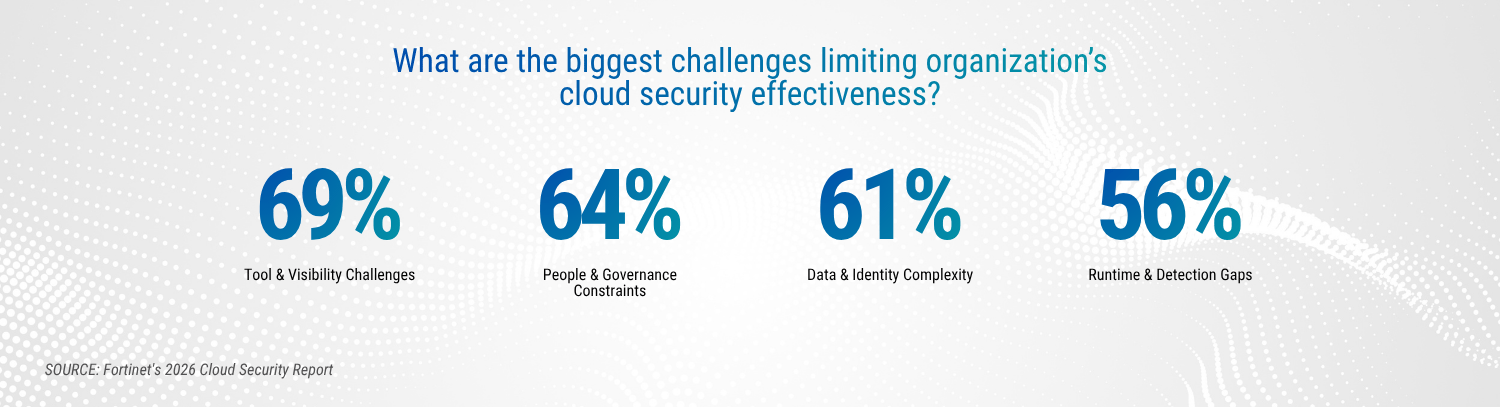
Fortinet's 2026 Cloud Security Report, found that 69% of security leaders name tool sprawl and visibility gaps as their top barrier to effective cloud security. Microsoft and Omdia found that security teams pivot across an average of 10.9 consoles to piece together context, and that only about 59% of tools push data to the SIEM, so a lot of it still gets pulled together by hand.
A few patterns tend to show up when the stack is creating work instead of reducing it:
Alerts land in different places. Someone has to piece together the story of a single incident from several consoles.
Nobody owns the tuning. Conditional Access, Defender policies and Sentinel rules were set up once and haven't been reviewed since.
Secure Score recommendations pile up. There's a list, but no owner and no timeline.
Licensed features sit switched off. You're paying for capabilities that aren't configured or enforced.
Gaps surface at the worst moment. You find them during an incident, an audit or a renewal conversation.
Attackers go where access is easiest. Microsoft's 2026 Digital Defense Report shows a lot of that activity running through sign-ins. Phishing made up 23% of observed intrusions in 2026, up from 7% the year before, and 52.2% of intrusions involving valid accounts led to further credential theft. Microsoft calls identity the primary control plane for defense, covering people as well as the applications and agents that act on their behalf.
Verizon's 2026 Data Breach Investigations Report adds useful context. Exploitation of vulnerabilities is now the top way in at 31% of breaches, ahead of phishing at 16% and credential abuse at 13%, with pretexting (newly tracked this year) at 6%.
That mix is a good reason to look at identity and devices together, because a strong sign-in policy goes furthest when the devices behind it are managed, patched and healthy.
A few questions are worth asking about your own environment:
People are part of the picture too. Verizon found the human element in 62% of breaches, which is why identity controls and a strong human risk program work best side by side. 👬
When these tools work together, each one makes the others smarter:
Microsoft makes the same point in its 2026 report insights: activity that looks incomplete in one part of an environment can become clearer when separate signals are considered together.
None of that happens automatically. Tuning decides whether you get useful detections or noise, and speed matters. Attackers are staying hidden longer, with Microsoft reporting that dwell time increased across multiple sectors in 2026, even as organizations responded faster once an intrusion was found.
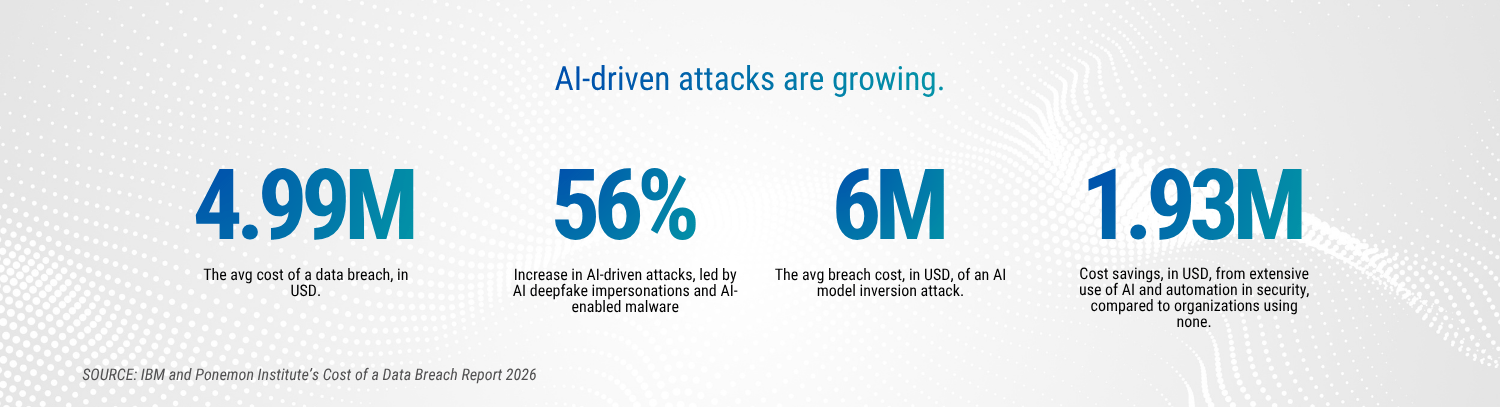
The cost of slow detection is also climbing. IBM's 2026 Cost of a Data Breach Report put the global average at a record $4.99 million, up 12%, and the mean time to identify and contain a breach rose to 247 days.The same research found that organizations using security AI and automation extensively saved an average of $1.93 million and shortened breach lifecycles by 65 days.
Secure Score is a helpful way to see where you stand. Think of it as a prioritized to-do list with a name next to every line.
You can run this check in an afternoon:
If you hesitated on more than one, that's a good sign it's time for a closer look.
When the pieces fit together, you'll notice a few things:
If you want to know where your Microsoft security tools stand today, a Threat Protection Assessment checks what's actually configured and enforced. You'll see real admin counts, real MFA enforcement, how your Conditional Access policies measure up against a documented standard, and how your Defender coverage looks. You'll also get a Secure Score baseline. Every finding is risk-rated and tied to a business reason, so you leave with a short, ordered list of what to fix first.
Most Microsoft environments already have the right pieces. Entra handles identity, Defender watches for threats, Intune manages devices and Sentinel...

How confident are you that your current security awareness program can stop AI-era phishing and social engineering before one message becomes an...

Your employees already have new AI coworkers.